
1 How Subscriptions Work
PoGO Alerts Network uses a flexible subscription system designed to fit trainers of all levels. Each subscription includes monthly tokens that you allocate to geographic regions for scanning coverage.
Regional Tokens
Tokens are the currency of coverage. Your plan already covers alerts and the map everywhere we scan — each token you place decides which area your money funds, and how much scanner time it gets.
Monthly Billing
Subscriptions renew monthly. Your tokens refresh at each billing cycle, and you can change plans at any time.
Expandable Coverage
Need more coverage? Add token pack add-ons to your subscription for additional monthly tokens at discounted rates.
2 What each plan shows
Which plan you're on decides what the map shows you. Tokens don't.
- Free account: the live map with PokéStops, gyms, raids and lures, plus the outlines of the areas we scan and when each cell was last scanned. No spawns and no DM alerts.
- Basic: adds live spawns with IV, CP and stats, plus PvP rankings, quests, invasions, nests, weather, routes, Power Spots and Max Battles, portals, submission cells and the S2 cell grid. It also adds Discord DM alerts anywhere we cover. Comes with 1 monthly token.
- Premium: everything in Basic, plus Scan an Area on the live map, anywhere on earth. Comes with 2 monthly tokens.
- Running a local community? The Community add-on sends alerts to your own server's channels.
Prices, and yearly billing with two months free, are on the Pricing page.
3 Just paid? Get the map and alerts
Place your token
The first time you open your dashboard with a token that isn't on an area, the site takes you to pick one. You can tap Not now once per visit, but the token does nothing until it's placed. See Place a token.
Open the map
- Go to map.pogoalerts.net. On a computer it's Live Map in the side menu. On a phone it's the Live Map tile on your dashboard.
- Sign in on the map with the same account you paid with. It sends you to pogoalerts.net to log in and brings you back.
- Still no spawns? The map rechecks your plan about every two minutes, so wait two minutes and reload it. If that doesn't help, sign out of the map and sign in again. Then check that Pokémon is switched on in the map's menu.
Set up alerts
Link Discord on your profile, stay in the PGAN Discord server, then follow Your first alert: every hundo near you. Alerts are set up at alerts.pogoalerts.net (Alert Settings on your dashboard).
4 Plan Comparison
Choose from our tiered subscription plans. Each tier builds on the previous, offering more tokens and premium features.
Basic
- Coverage in 1 region
- Real-time Discord DM alerts
- Interactive map access
Premium
- Coverage in 2 regions
- Real-time Discord DM alerts
- Interactive map access
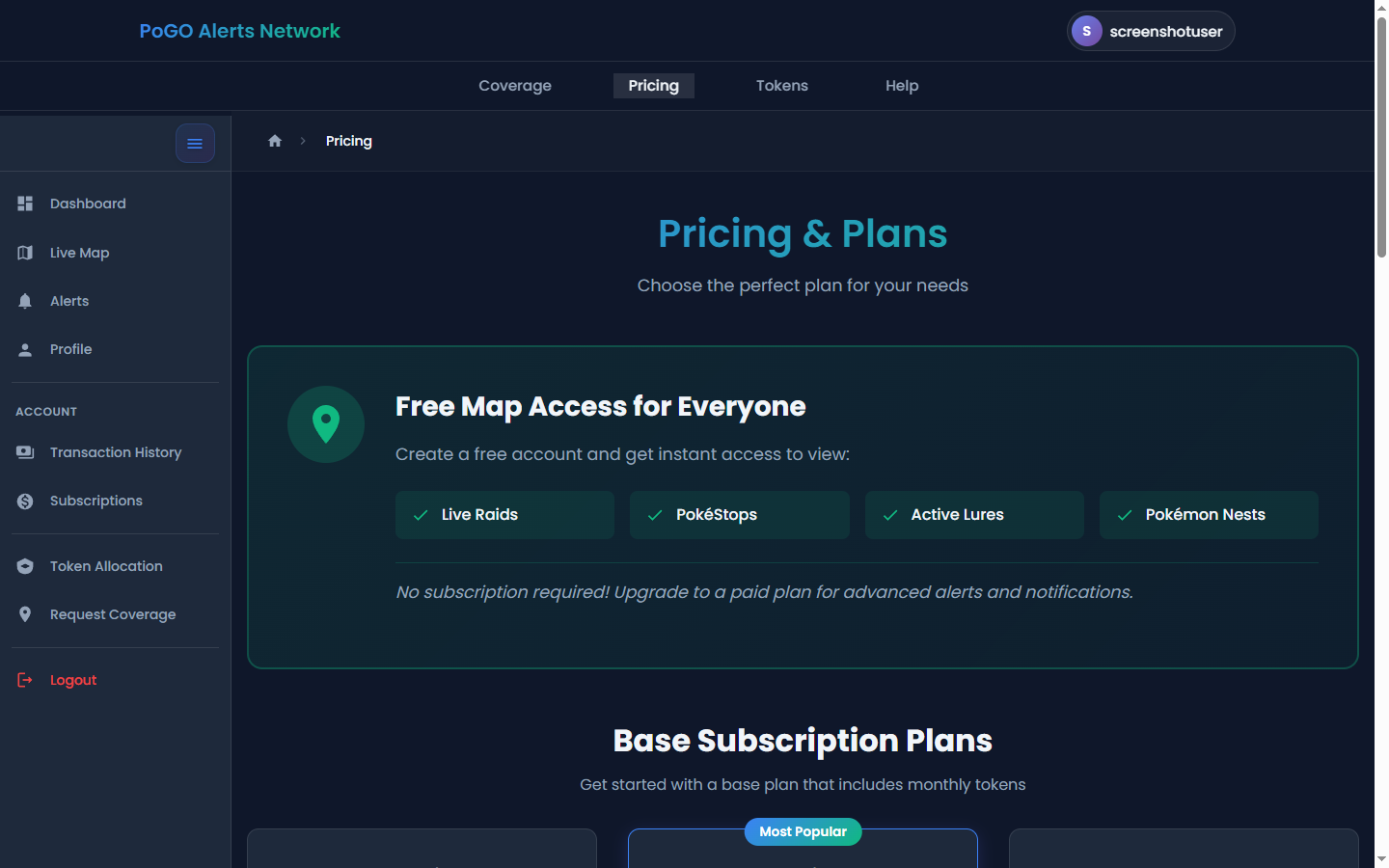
Compare our subscription plans on the Pricing page
5 Choosing the Right Plan
Not sure which plan fits your needs? Here's a guide to help you decide:
Casual Trainer
You play in one main area and want alerts for rare spawns and hundos nearby.
Active Player
You play regularly across multiple areas - home, work, and favorite parks. You want reliable coverage.
Hardcore Hunter
You travel for Pokemon, need maximum coverage, and want every competitive advantage for rare spawns.
Community Leader
You run a Discord server and want to provide alerts to your community members.
6 Token Pack Add-Ons
Need more regional coverage than your base plan provides? Token Pack Add-Ons let you expand your coverage at discounted rates compared to upgrading your entire plan.
7 Community Add-On
Running a Pokemon GO community on Discord? The Community Add-On lets you send alerts to your server's channels, not just personal DMs.
5 Discord Channels Included
Configure up to 5 webhook channels for your community at no extra cost with the base add-on.
Extra Channels Available
Need more channels? Add additional webhook channels for $10/month each.
Per-Channel Configuration
Each channel can have its own alert settings - perfect for organizing by Pokemon type, rarity, or location.
12 Bonus Tokens
The Community Add-On includes 12 additional monthly tokens for expanded regional coverage.
8 Changing Your Plan
Your subscription is flexible. You can upgrade, downgrade, or modify your plan at any time.
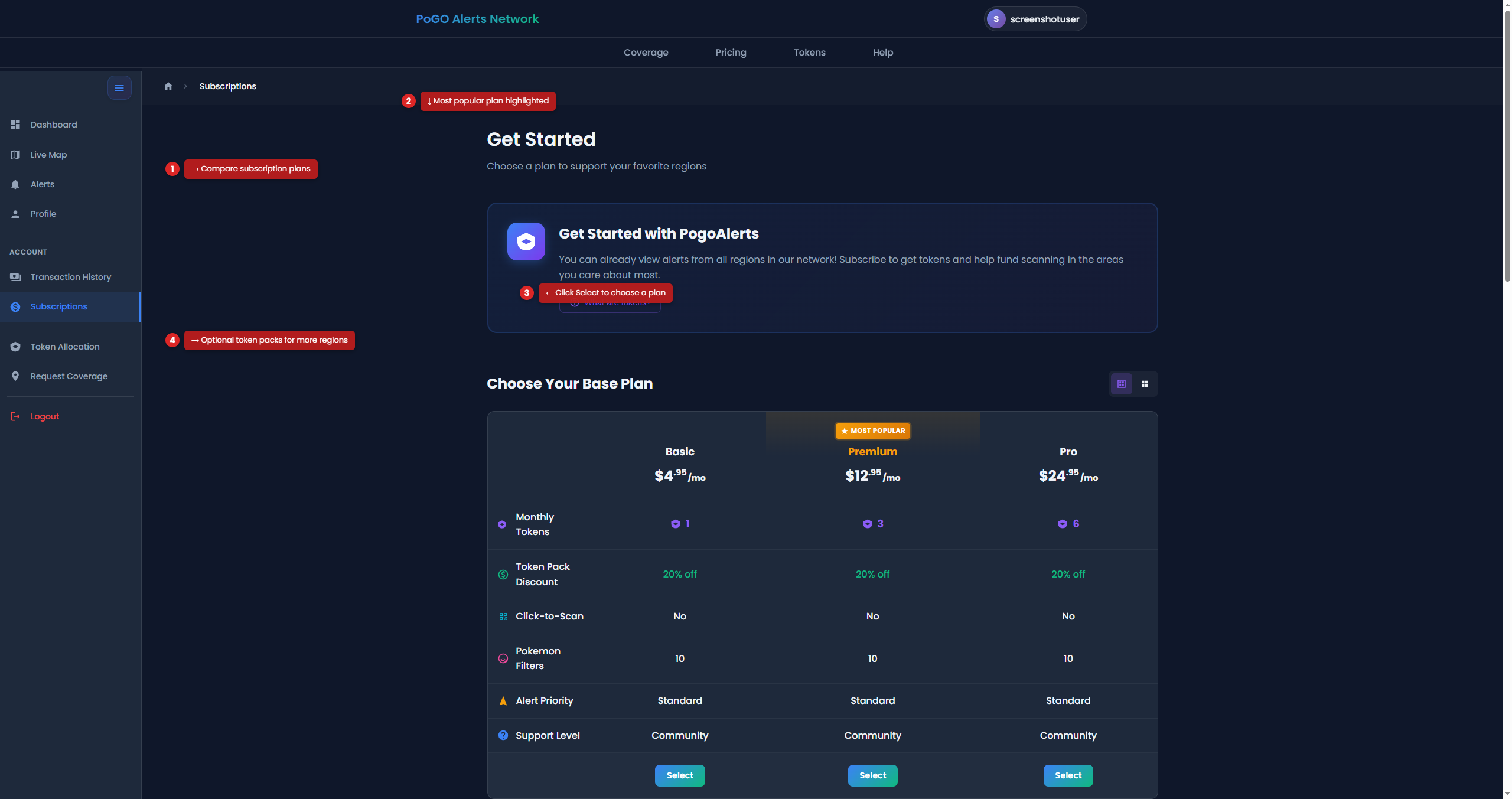
Manage your subscription and add-ons from the Subscriptions page
9 Frequently Asked Questions
What happens to my tokens if I cancel?
Your tokens keep funding their regions until the end of the period you have paid for. After that they expire and your alerts stop — because the subscription has ended, not because of anything to do with where the tokens were placed. Resubscribe and you get a fresh set to place.
Can I pause my subscription?
Yes, on a monthly card plan. When you cancel, you're offered a pause of 1 to 3 months, and you aren't charged while paused. It isn't offered on yearly or PayPal plans, while a payment is overdue, or while you have the Community add-on.
Do unused tokens roll over?
No, and there is nothing to lose by that. Each billing cycle issues your plan's tokens fresh and the previous set expires, so you always hold the same number rather than banking them up. One-time purchase tokens are separate and run for 30 days from the date you buy them. Your regions do carry over: each new set arrives already placed where the last one was, so you only revisit it to move something.
Can I have multiple subscriptions?
Each account can have one active base subscription. You can add multiple token pack add-ons and one Community Add-On.
What payment methods do you accept?
New plans are paid by card at checkout. Plans that already run on PayPal keep working. See our Payment Methods guide for details.
Is there a free trial?
We don't offer free trials, but you can start with our lowest tier to try the service. You can upgrade anytime if you need more coverage.